Pages

lokesh

...

C# Interview Questions and Answers

Hello  I an lokesh saini today we learn C# Interview Questions and Answers this is very important
for fresher C# student,


Click here     C# Interview Questions and Answers 


 Q.1 what­   is­  static   ­constructor.?
Static constructor is used to initialize static data members as soon as the class is referenced first time, whereas an instance constructor is used to create an instance of that class with keyword. A static constructor does not take access modifiers or have parameters and can't access any nonelastic data member of a class.

Q.2  What is the use of Monitor in C#?   

It provides a mechanism that synchronizes access to objects.
The Monitor class controls access to objects by granting a lock for an object to a single thread. Object locks provide the ability to restrict access to a block of code, commonly called a critical section. While a thread owns the lock for an object, no other thread can acquire that lock. You can also use Monitor to ensure that no other thread is allowed to access a section of application code being executed by the lock owner, unless the other thread is executing the code using a different locked object


Q.3 What is lock statement in C#?  


Lock ensures that one thread does not enter a critical section of code while another thread is in the critical section. If another thread attempts to enter a locked code, it will wait, block, until the object is released.


Q.4 How to loop through all rows of the DataTable.?


You can do this in more than one way but For Each loop is much better than any other way in terms of cleanliness of the code or performance. 

ForEach loop  foreach (DataRow row in dTable.Rows)
{
     yourvariable = row["ColumnName"].ToString();
}
For loop
for (int j = 0; j< dTable.Rows.Count; j++)
{
    yourvariable = dTable.Rows[j]["ColumnName"].ToString()l
}

Q.5 What is an Array? 
A array  is a collection of slimier data type is store the values in index  the will be always start with 0 is called array 

other definition:- An array is a collection of related instance either value or reference types. Array posses an immutable structure in which the number of dimensions and size of the array are fixed at instantiation

Q.6 C# Supports Single, Mult dimensional and Jagged Array. 

Single Dimensional Array: it is sometimes called vector array consists of single row. 
Multidimensional Array: are rectangular & consists of rows and columns. 
Jagged Array: also consists of rows & columns but in irregular shaped (like row 1 has 3 column and row 2 has 5 column)


Next topic of typing

 hello i am lokesh saini  now will be learn more                          History of typing


Position
Incorrect positioning at the computer and harmful typing habits may cause harmful effects on your body you need to know the safe position
Safe Position
Keep your head strait
In order to prevent neck pains and headaches, it is important to keep your head up but not tilted back.
Adjust your monitor
The monitor should be placed so that you can see over its top edge. This is because eyes are more comfortable when they are looking slightly downward
 Lean slightly forward
Leaning slightly forward from the hip balances your weight and allows your back muscles to relax.
 Centre your body in front of the keyboard
Cantering the body balances the weight of the body and relieves muscle strain. Cantering the body also lets you keep your wrists straight.
Relax your shoulders
Tensing the shoulders can lead to pain and muscle fatigue.
Keep your feet flat on the floor
Try to keep your feet flat on the floor to support and balance your body weight. Keep your knees square so that the chair does not compress blood vessels and nerves in the back of your legs. This allows for better circulation.
Keep your elbows close to your body
Keeping your elbows close to your body helps keep your wrists straight and allows shoulder muscles to relax.
Keep your wrists parallel to the keyboard
Keep your wrists flat and straight and your forearms parallel to the slope of the keyboard.
If your elbows are lower than the keyboard, tip the keyboard up in order to keep the wrists parallel to the keyboard.
Keep your wrists off the computer
Never rest your palms on the keyboard or place your wrists on a wrist rest while you type
Usually, your body warns against injury by sending pain signals to the brain. Injuries from unsafe posture occur over a long time so you don't feel pain right away. When you do feel discomfort, damage may already be done. Even if you are not feeling pain now, it is important to keep safe positioning to avoid problems.
Hand Exercise
This page shows exercises that you can do at your desk.

You need not to do all of them and you do not need to do them in the order in which they are presented.

Hold each stretch for 15-30 seconds, and repeat three times. The number of repetitions and the duration of each exercise are only guidelines.

Make sure as you do the exercises that you feel only a gentle stretch and no pain. If you begin to feel pain, reduce the number of repetitions, shorten the time you hold the position or do not do the exercise. If you have any questions whether these stretches are appropriate for you, please consult your doctor.
 

Hold both hands in front of you and stretch them for a few seconds splaying the fingers until you feel a gentle stretch.


Hold both hands in front of you and curl your fingers and thumbs under, at the first knuckle.


With your arms straight in front of you, raise your right hand so your palm is facing away from you and place the palm of the left hand on the fingers of the right. Press the finger towards you with the left hand until you fee a gentle stretch. Change hands and repeat.


With your arms in front of you, drop the right hand down and bend at the wrist. Place the left hand on the knuckles of the right and press toward you until you feel a gentle stretch in the top of the wrist of the right hand. Change hands and repeat.


Hold your right hand in front of you, palm up, and use your left hand to massage your right. Massage the inside and outside of the hand and between the fingers. Change hands and repeat.


With your arms straight in front of you, lace your fingers together. Then turn your hands down and over so your palms are facing away from you and press until your arms are straight.
Neck and Shoulders Exercise


Raise your arms over your head and lace your fingers together. Then turn your wrists so that your palms face toward the ceiling and lift your arms straight above you until you feel a gentle stretch.


Wrap one arm around you, resting the wrist on the opposite shoulder. Place the palm of the other hand on the elbow, press gently towards you and hold for a few seconds to feel a gentle stretch. Repeat on Next topic of typing the other side.
 

Raise your right arm above your head and then bend at the elbow so that your right hand is behind your head. Place your left hand on your right elbow and gently push your right elbow behind your head until you feel a stretch. Repeat on the other side.


Tilt your head forward and hold for a few seconds until you feel a gentle stretch in the back of your neck.


Tilt your head back and hold for a few seconds until you fee a gentle stretch in your throat.


Tilt your head to one side and hold for a few seconds until you fee al stretch in the side of your neck. Repeat on the other side.

(Click Next Button to go to next Lesson)


How Learn typing and History

                           Welcome to लोकेश 's Typing Tutor

Introduction

Touch-typing means typing with all your fingers and without need for looking at the keyboard for finding the keys

Benefits with touch typing
Increased Efficiency
Touch-typing is more efficient because the typist uses all fingers instead of just a few fingers. As a result, typing speed will increase dramatically.

Increased Effectiveness
Touch-typing is more effective because the typist looks at the output on the screen, not the keyboard.

Less Mental Fatigue
Touch-typing is less demanding on the brain because the brain does not need to cope with two issues, that of locating the keys and focusing on the output

Less Physical Fatigue
Touch-typing is also less tiring because it distributes the total load over all fingers. Touch typing, because of its natural and flowing finger movements, results in less stress.

Less Wear and Tear
Touch-typing reduces wear and tear on the few fingers that are constantly being used. The load is spread over many more fingers and thus the risk of Cumulative Trauma Disorder is reduced.


 commonly used symbol keys
There are twenty one parts in Basic Lessons


2) Requirements:  About All basic requirements for good typing practise
3) Position:  Introduces correct body and hand position which are essential to keyboarding by touch.
4) Key Board:  Basics of key board and about deferent types of key boards.
5) Keys:  Basics of keys, Key names, Key Location and its usage.
6) Fingers:  Teaches name of each finger and its position. Every finger action is illustrated. This lesson also introduces correct positioning of fingers and exact striking techniques.
7) Basic Keyboarding 1:  Teaches basics of keyboarding
8) Basic Keyboarding 2:  Home keys      asdf
9) Basic Keyboarding 3:  Home keys       jkl;
10) Basic Keyboarding 4:  Home keys      all
11) Basic Keyboarding 5:  Upper keys     qwer
12) Basic Keyboarding 6:  Upper keys     poiu
13) Basic Keyboarding 7:  Upper keys     all
14) Basic Keyboarding 8:  Lower keys     zxcv
15) Basic Keyboarding 9:  Lower keys     nm,.
16) Basic Keyboarding 10:  Lower keys     all
17) Basic Keyboarding 11:  Home and Upper keys
18) Basic Keyboarding 12:  Home and Lower Keys
19) Basic Keyboarding 13:  Capitals
20) Basic Keyboarding 14:  Numbers
21) Basic Keyboarding 15:  All basic keys

                     History & Requirements  

History:

History of Typewriter


Shole was a U.S. mechanical engineer who invented the first practical modern typewriter, patented in 1868. Shole invented the typewriter with partners S. W. Soule and G. Glidden, that was manufactured (by Remington Arms Company) in 1873

History of Keyboard


Perhaps the most attention paid to the keyboard as a human interface was by IBM in 1984, and was in regard to the compatibility of the layout of the Personal Computer that it had just developed with the layout of the Selectric™ typewriter. The Personal Computer had no jamming problems and its keyboard could handle even the fastest typist. Therefore the issue of separating the keys did not pose itself.

Moreover, no attention seems to have been paid by IBM to the fact that the newly developed Personal Computer was going to be used primarily by people with little or no typing skills and to whom therefore the issue of the "QWERTY legacy" was unimportant. (QWERTY - Lesson- 4)

Because of this, IBM could have redesigned the layout of the Personal Computer keyboard to a more ergonomic and user friendly layout. Unfortunately, IBM missed this wonderful opportunity and so it is that a keyboard layout designed over a century ago, for a different technological situation, is in use on over 500 million computers today

Requirements

You need some basic requirements to learn typing

Desktop Computer or Laptop:
First you need one Desktop computer or Laptop Computer with
All basic equipment

Monitor:


It is always bettor you have a color monitor or a LCD screed

Keyboard:

You need to have English Key board with all basic keys

Other:
Soundcard, sound boxes


Computer desk and Chair:
You need a very good computer desk and chair, should be comfortable and adjustable

Software:
Windows Operating system

Skills:
You need to have basic Windows operating system skills like starting the computer opening the application and closing the application

Check all your requirements before you to next lesson
Desk Top Computer
High Resolution Colour Monitor
English Key Board
Sound card and Sound Boxes
Windows Operating System and Basic Skills


चिड़ावा शहर कि स्वीट


 चिड़ावा को कशी नगरी के नाम से जाना जाता है  यह नाम  पंडित जी  ने रखा था  जिशको शिव नगरी कहते है
 चिड़ावा  एक   शहर है  जिसमें  वार्रियस  जाती  के  लोग रहते  जो  कि   अलग  धरमो को एक साथ   जोड़ता
चिड़ावा शहर  में पीड़ित  गणेश  नारायण  का  विशाल मंदिर है  जिसमे  सभी लोग  अपना माथा  टेकते  है
 पीड़ित  गणेश  नारायण  को लोक देवता के रूप में पूजते  है


चिड़ावा शहर कि स्वीट बहूत ही अचछी    चिड़ावा शहर  स्वीट के कारण   विख्यात  है  जिसमे  अनेक  प्रकार के स्वीट  बना के  सेल्स की जाती है


Master Android 6 Marshmallow Software Development


Master Android 6 Marshmallow Software                        Development


What are the requirements?

  • A PC or a Mac is required to use for development apps
  • A real Android device is NOT needed. The course covers have to use an Android Virtual device (an emulator which runs on your PC or Mac) if you don't have a physical Android device
  • All videos now have sub-titles to assist those who dont have english as a first language, but also for people (like me) who just like to watch videos with subtitles.
    You will obtain the skills to build progressively more complex Apps using Android Marshmallow: you will start off by building basic apps, and progress to more complex apps showcasing the more advanced features of Android.
    Here are the apps you will build from scratch in this course. All of these are designed to teach you Android development from scratch and get more and more complex as you work your way through the course, as we start using more advanced Android concepts in the apps being build.
    A basic "hello" app, then a button click app.
    We then move on to a Calculator app where you learn to put together a calculator and add common calculator functionality.
    The Flickr app is next where you will learn how to use a popular image sharing site and how to search and retrieve a list of images by a custom search term and display them in a list and then in a separate enlarged window.
    Moving on, we will develop an app that accesses the built in Android Contacts using the new Marshmallow permissions functionality.
    Then we will create our own Friends app to maintain our own database of friends in a database.
    The Personal notes app is next where you will build a complete personal notes application, including notification scheduler/alarm, notes capability and the use of the camera or photo gallery to add an optional picture, and then saving of the picture to the local device, Google Drive, or Dropbox.


  • What am I going to get from this course?
    • Learn the skills needed to obtain a new career developing Android apps
    • Kick yourself into a new career with your new Android development skills!
    • See step by step how to put Android applications together
    • Work more efficiently with Android development by learning the best tools and practices
    • Cure any self confidence doubts by finally learning how to develop apps
    • Join a small group of people who really understand Android Lollipop
    • Learn how to develop in Java
    • Understand how Android works
    • Earn more with your new Android development skills
    • Learn how to develop apps for Android phones and tablets
    • Pat yourself on the back with your new knowledge of Android app development
                       KIDS WEAR 
Shop for clothing for boys, girls and babies. Explore the range of tops, tees, jeans, shirts,
 trousers, skirts, body suits from popular kids' clothing brands such as Disney, Marvel,
 Nauti ,Nita, Cupcake, Barbie.  

Cute Fashion Kids Girls Baby Princess Blue Party Wear Flower Dresses

 Skirt Clothes 3 Month to 4 Years


ypical questions asked about products:
 -  Is the item durable?
 -  Is this item easy to use?
 -  What are the dimensions of this item?

Home furniture information


Add caption


Modern furniture refers to furniture produced from the late 19th century through the present that is influenced by modernism. Post-World War II ideals of cutting excess, commodification, and practicality of materials in design heavily influenced the aesthetic of the furniture. It was a tremendous departure from all furniture design that had gone before it. There was an opposition to the decorative arts, which included Art NouveauNeoclassical, and Victorian styles. Dark or gilded carved wood and richly patterned fabrics from the gave way to the glittering simplicity and geometry of polished metal. The forms of furniture evolved from visually heavy to visually light. This shift from decorative to minimalist principles of design can be attributed to the introduction of new technology, changes in philosophy, and the influences of the principles of architecture. As Philip Johnson, the founder of the Department of Architecture and Design at the Museum of Modern Art articulates:[1]
"Today industrial design is functionally motivated and follows the same principles as modern architecture: machine-like simplicity, smoothness of surface, avoidance of ornament.... It is perhaps the most fundamental contrast between the two periods of design that in 1900 the Decorative Arts possessed..."


With the machine aesthetic, modern furniture easily came to promote factory modules, which emphasized the time-managing, efficient ideals of the period. Modernist design was able to strip down decorative elements and focus on the design of the object in order to save time, money, material, and labor. The goal of modern design was to capture timeless beauty in spare precision 


Philosophy 

Prior to the modernist design movement there was an emphasis on furniture as ornament. The length of time a piece took to create was often a measure of its value and desirability. The origins of design can be traced back to the Industrial Revolution and the birth of mechanized production. With new resources and advancements, a new philosophy emerged, one that shifted the emphasis of objects being created for decorative purposes to being designs that promote functionality, accessibility, and production.[3]
The idea of accessible, mass-produced design that is affordable to anyone was not only applied to industrial mechanics, but also to the aesthetics of architecture and furniture. This philosophy of practicality came to be called Functionalism. It became a popular "catchword" and played a large role in theories of modern design. Functionalism rejected the imitation of stylistic and historical forms, and sought an establishment of functionality in a piece. Functionalist designers would consider the interaction of the design with its user and how any of the features, such as shape, color, and size, would conform to the human posture.[4] Western design generally, whether architectural or design of furniture, had for millennia sought to convey an idea of lineage, a connection with tradition and history. However, the modern movement sought newness, originality, technical innovation, and ultimately the message that it conveyed spoke of the present and the future, rather than of what had gone before it[ 

Influential Groups[edit]

Modernist design seems to have evolved out of a combination of influences: technically innovative materials and new manufacturing methods. Following the Second Industrial Revolution, new philosophies and artists emerged from the De Stijl movement in the Netherlands, the Deutscher Werkbund and the Bauhaus school, both located in Germany.

De Stijl 

The De Stijl (The Style) movement, was founded in 1917 by Theo Van Doesburg in Amsterdam. The movement was based on the principles of promoting abstraction and universality by reducing excessive elements down to the essentials of form and color. Dutch design generally has shown a preference for simple materials and construction, but De Stijl artists, architects, and designers strove to combine these elements to create a new visual culture. Characteristics of furniture from this movement include: simplified geometry of vertical and horizontal compositions and pure primary colors and black and white. It was the rejection of the decorative excesses from Art Nouveau, and promoted logicality through construction and function. Influential artists from this movement include Gerrit Rietveld, Piet Mondrian, and Mies van der Rohe, who continued to evolve the ideas of modernist design.[5][6]:33–183

Deutscher Werkbund 

Founded in 1907 in Munich, Germany, the Deutscher Werkbund was an organization of artists, designers, and manufacturers that pushed to create a cultural utopia achieved through design and new ideals in the early twentieth century. They shared the Modern thought of "form follows function" as well as the "ethically pure" design principles such as quality, material honestly, functionality, and sustainability. The DWB played a key role in advocating these ideals to other German artists and designers, which inspired the development of many Modern design institutions. Among the most notable architects and designers from the DWB are: Hermann Muthesius, Peter Behrens, and Ludwig Mies van der Rohe. 

The Bauhaus School 

The Bauhaus school, originally founded in 1919 in Weimar, Germany, by architect Walter Gropius, was an art school that combined all aspects of art. It eventually was forced to moved to Dessau, Germany, in 1925 due to political tensions, then Berlin, in 1932 until the doors of the school were closed from the pressure of the Nazi regime. With the change of location came a change of direction in the institution. The Bauhaus adopted an emphasis on production in Dessau, but maintained its intellectual concerns in design.[8]Throughout the years, the goal of the institution was to combine intellectual, practical, commercial, and aesthetic concerns through art and technology. The Bauhaus promoted the unity of all areas of art and design: from typography to tableware, clothing, performance, furniture, art, and architecture. Prominent artists and designers from the Bauhaus include: Marcel BreurMarianne Brandt, Hannes Meyer (who was Gropius's successor, only to be replaced by Mies van der Rohe)  

African and Asian culture 

An aesthetic preference for the baroque and the complex was challenged not only by new materials and the courage and creativity of a few Europeans, but also by the growing access to African and Asian design. In particular the influence of Japanese design is legend: in the last years of the 19th century the Edo Period in Japan, Japanese isolationist policy began to soften, and trade with the west began in ernest. The artifacts that emerged were striking in their simplicity, their use of solid planes of color without ornament, and contrasting use of pattern. A tremendous fashion for all things Japanese - Japonism - swept Europe. Some say that the western Art Nouveau movement emerged from this influence directly. Designers such as Charles Rennie  MacIntosh and Eileen Gray are known for both their modern and Art Deco work, and they and others like Frank Lloyd Wrightare notable for a certain elegant blending of the two styles.

Materials 
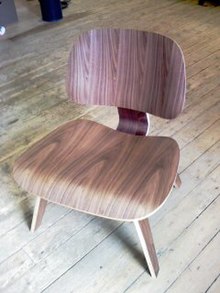
Eames Lounge Chair Wood (LCW)
The use of new materials, such as steel in its many forms; glass, used by Walter Gropius; molded plywood, such as that used by Charles and Ray Eames; and of course plastics, were formative in the creation of these new designs. They would have been considered pioneering, even shocking in contrast to what came before. This interest in new and innovative materials and methods - produced a certain blending of the disciplines of technology and art. And this became a working philosophy among the members of the Deutscher Werkbund. The Werkbund was a government sponsored organization to promote German art and design around the world. Many of those involved with it including Mies van der Rohe, Lilly Reich and others, were later involved in the Bauhaus School, and so it is not surprising perhaps that the Bauhaus School took on the mantle of this philosophy. They evolved a particular interest in using these new materials in such a way that they might be mass-produced and therefore make good design more accessible to the masses.


Gerrit Rietveld's Red-Blue Armchair[edit]

The first versions of Gerrit Rietveld's Red-Blue Armchair were created around 1917. However, they were originally stained black - the color were eventually added to give characteristics of De Stijl in 1923. Rietveld's intent was to design a piece of furniture that could be cheaply mass-produced. He uses standard beechwood laths and pine planks that intersect and are fixed by wooden pegs. The functions of construction, the seat, the back and armrests are explicitly separated from one another visually. In fact, Rietveld saw the chair as the skeleton of an overstuffed armchair with all the excessive components removed. [6]:32–183

Marcel Breuer's Wassily Chair[edit]

This modernist creation is perhaps one of the most iconic furniture designs of all time. The Wassily Chair, also known as the Model B3 chair, was designed by Marcel Breuer in 1925-26 while he was the head of the cabinet-making workshop at the Bauhaus, in Dessau, Germany.
This piece is particularly influential because it introduces a simple, yet elegant and light-weight industrial material to be used in structures within the domestic space: chrome plated tubular steel. The design of the chair is revolutionary with its use of symmetrical, geometric planes framed by the tubular steel. Breuer uses simple straps of canvas for the seat, back and arm rests to support the seated figure. The concept of the use of tubular steel, a never before seen material in the domestic space was inspired by the handles of Breuer's bicycle. He reasoned that if such a material was light-weight yet strong enough to support the body in motion, it is likely to be able to support the body at rest. He applies uncomplicated essentials (the canvas strips) to create a functional aesthetic as well. Nonetheless, the Model B3 Chair (dubbed the Wassily Chair by the manufacturing company, Gavina after learning of the anecdote involving the painter Wassily Kandinsky) inspired many artists and designers to include the use of chrome plated steel, including Le Corbusier, who includes it as a structure for his Chaise Longue.

Le Corbusier Chaise Lounge 

Inspired by Marcel Breuer's use of chrome plated tubular steel in his Wassily Chair, in 1928, Le Corbusier creates a sleek steel support for the back and seat of his Chaise Longue. The Chaise Longue features a movable seat section and an adjustable head rest, which is an early example of ergonomic design. With the tubular steel frames and leather or skin upholstery, the sleek Chaise Longue were initially manufactured for private French house commissions including the Villa Savoye, Poissy (1929–31) and the Ville d'Avray. This piece epitomizes the mass production of the industrial age through the use of materials and structure. However, unlike the Wassily Chair, the complex design made reproduction expensive.[6]:48–183

Eileen Gray side table 

Designed in 1927 as a bedside table for the guest room in E-1027, the home Eileen Gray designed for herself (and Jean Badovici) in Cap Martin, France, the asymmetry of this piece is characteristic of her "non-conformist" design style in her architectural projects and furniture. Eileen Gray had always been influenced by Japanese lacquer and furniture, and the minimalist lines and elegant structure found normally in traditional Japanese works are found in most of Gray's objects. The name, E-1027, can be seen in a somewhat romantic reading: The E stands for "Eileen" and the numbers, corresponding to their sequence in the alphabet, stand for JB, and G. The second and tenth letter allude to her friend and mentor, Jean Badovici.Gray's emphasis on functionalist design is apparent in her use of tubular steel and the concentric symmetry of the surface. Notably, this piece also has specific utility, as it can be adjusted such that one can eat breakfast in bed on it. Gray's sister had requested such accommodation during her visits to E-1027. [6]:46–183

Mies van der Rohe Barcelona chair[edit]

The Barcelona chair has come to represent the Bauhaus design movement. Many consider it to be functional art, rather than just furniture. Designed by Mies Van Der Rohe andLilly Reich in 1929 for the German Pavilion at the international design fair,[10] the 1929 Barcelona International Exposition, it is said to have been inspired by both the folding chairs of the Pharaohs, and the 'X' shaped footstools of the Romans, and dedicated to the Spanish royal families. Like other designers following Breuer's example, he incorporates the use of chrome-plated flat steel bars to create a single 'S'shaped curve. The front legs crosses the 'S' curve of the bars forming the seat and the back legs. It creates a sleek and intentionally simple aesthetic to the piece.

Noguchi coffee table[edit]

Noguchi table was designed by Isamu Noguchi (1904 - 1988), a sculptor, draftsman, potter, architect, landscape architect, product, furniture and stage designer. Half American, half Japanese, he is famous for his organic modern forms. He often stated, "Everything is sculpture, any materials, any idea without hindrance born into space, I consider sculpture." The Noguchi table - has become famous for its unique and unmistakable simplicity. It is refined and at the same time natural, it is one of the most sought after pieces associated with the modern classic furniture movement.

Chronology[edit]

Chronologically the design movement that produced modern furniture design, began earlier than one might imagine. Many of its most recognizable personalities were born of the 19th or the very beginning of the 20th centuries.
They were teaching and studying in Germany and elsewhere in the 1920s and 30s. At among other places the Bauhaus school of art and architecture. The furniture that was produced during this era is today known as "Modern Classic Furniture" or "Mid Century Modern".
Both the Bauhaus School and the Deutscher Werkbund had as their specific creative emphasis the blending of technology, new materials and art.

Transitional furniture

Obviously not all furniture produced since this time is modern, for there is still a tremendous amount of traditional design being reproduced for today's market and then of course there is also an entire breed of design which sits between the two, and is referred to as transitional design. Neither entirely modern or traditional, it seeks to blend elements of multiple styles. It often includes both modern and traditional as well as making visual reference to classical Greek form and / or other non western styles (for example: Tribal African pattern, Asian scroll work etc.).

Modern to contemporary 

Today contemporary furniture designers and manufacturers continue to evolve design. Still seeking new materials, with which to produce unique forms, still employing simplicity and lightness of form, in preference to heavy ornament. And most of all they are still endeavoring to step beyond what has gone before to create entirely new visual experiences for us.
The designs that prompted this paradigm shift were produced in the middle of the 20th century, most of them well before 1960. And yet they are still regarded internationally as symbols of the modern age, the present and perhaps even the future. Modern Classic Furniture became an icon of elegance and sophistication.


What is MVC

 Definition:-
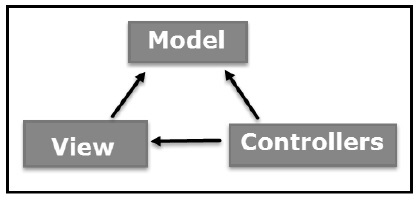
 Model-view-controller (MVC) is a software architectural pattern for implementing user interfaces. It divides a given software application into three interconnected parts, so as to separate internal representations of information from the ways that information is presented to or accepted from the user.

Audience

  .NET programmers beginning to learn MVC framework. This tutorial will bring you to Intermediate level of knowledge in MVC covering all the important aspects of MVC Framework with complete hands-on code experience.

Prerequisites

Basic knowledge of ASP.NET development (C# and VB language) and installed Visual Studio software.

What is MVC?

The Model-View-Controller (MVC) is an architectural pattern that separates an application into three main logical components: the model, the view, and the controller. Each of these components are built to handle specific development aspects of an application. MVC is one of the most frequently used industry-standard web development framework to create scalable and extensible projects.

MVC Components

Model: The Model component corresponds to all the data related logic that the user works with. This can represent either the data that is being transferred between the View and Controller components or any other business logic related data. For example, a Customer object will retrieve the customer information from the database, manipulate it and update it data back to the database or use it to render data.
View: The View component is used for all the UI logic of the application. For example, the Customer view would include all the UI components such as text boxes, dropdowns, etc. that the final user interacts with.
Controller: Controllers act as an interface between Model and View components to process all the business logic and incoming requests, manipulate data using the Model component and interact with the Views to render the final output. For example, the Customer controller would handle all the interactions and inputs from the Customer View and update the database using the Customer Model. The same controller would be used to view the Customer data.
model_view_controller


ASP.NET MVC
ASP.NET supports three major development models: Web Pages, Web Forms and MVC (Model View Controller). The ASP.NET MVC framework is a lightweight, highly testable presentation framework that is integrated with existing ASP.NET features, such as master pages, authentication, etc. Within .NET, this framework is defined in the System.Web.Mvc assembly. The latest version of the MVC Framework is 5.0. We use Visual Studio to create ASP.NET MVC applications which can be added as template in Visual Studio.

ASP.NET MVC Features

The ASP.NET MVC provides the following features:
  • Ideal for developing complex but light weight applications
  • It provides an extensible and pluggable framework which can be easily replaced and customized. For example, if you do not wish to use the in-built Razor or ASPX View Engine, then you can use any other third-party view engines or even customize the existing ones.
  • Utilizes the component-based design of the application by logically dividing it into Model, View and Controller components. This enables the developers to manage the complexity of large-scale projects and work on individual components.
  • The MVC structure enhances the test-driven development and testability of the application since all the components can be designed interface-based and tested using mock objects. Hence the ASP.NET MVC Framework is ideal for projects with large team of web developers.
  • Supports all the existing vast ASP.NET functionalities such as Authorization and Authentication, Master Pages, Data Binding, User Controls, Memberships, ASP.NET Routing, etc.
  • It does not use the concept of View State (which is present in ASP.NET). This helps in building applications which are light-weight and gives full control to the developers.
Thus, you can consider MVC Framework as a major framework built on top of ASP.NET providing a large set of added functionality with focus on component-based development and testing.

MVC Flow Diagram

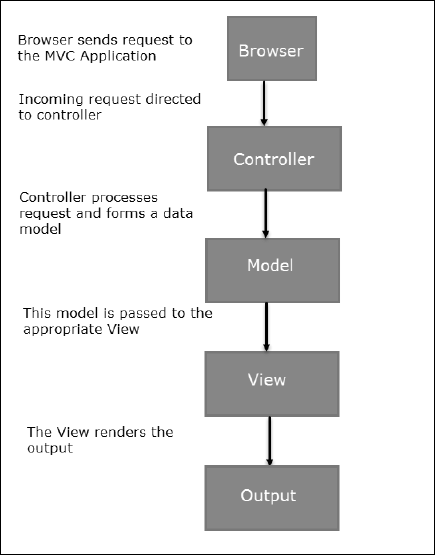
mvc_flow

Flow Steps

  • The client browser sends request to the MVC Application.
  • Global.ascx receives this request and performs routing based on the URL of incoming request using the RouteTable, RouteData, UrlRoutingModule and MvcRouteHandler objects.
  • This routing operation calls the appropriate controller and executes it using the IControllerFactory object and MvcHandler object's Execute method.
  • The Controller processes the data using Model and invokes the appropriate method using ControllerActionInvoker object
  • The processed Model is then passed to the View which in turn renders the final output.

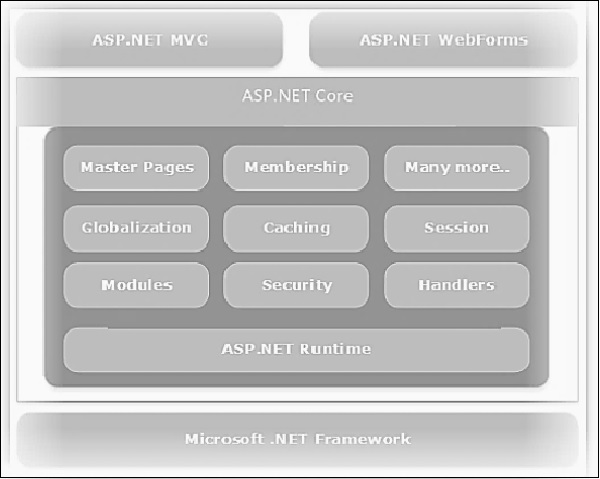
MVC and ASP.NET Web Forms are inter-related but different models of development depending on the requirement of the application and other factors. At a high level, you can consider that MVC is a more advanced and sophisticated web application framework designed with separation of concerns and testability in mind. Both the frameworks have their advantages and disadvantages depending on specific requirements. This concept can be visualized using the following diagram:

MVC and ASP.NET Diagram

mvc_and_asp_net_stack

Comparison Table

aspandmvccomparison