


WHAT IS HTML.?
What is HTML
A HTML is Hyper Text markup language.Which is Define between the < > also known as less than and greater than operator
is called HTML
HTML (Hypertext Markup Language) is the set of markup symbols or codes inserted in a file intended for display on a World Wide Web browser page. The markup tells the Web browser how to display a Web page's words and images for the user. Each individual markup code is referred to as an element (but many people also refer to it as a tag. Some elements come in pairs that indicate when some display effect is to begin and
Definition of HTML:-----
What is HTML?
HTML is a markup language for describing web documents (web pages).
- HTML stands for Hyper Text Markup Language
- A markup language is a set of markup tags
- HTML documents are described by HTML tags
- Each HTML tag describes different document content
Example Explained
- The <!DOCTYPE html> declaration defines this document to be HTML5
- The text between <html> and </html> describes an HTML document
- The text between <head> and </head> provides information about the document
- The text between <title> and </title> provides a title for the document
- The text between <body> and </body> describes the visible page content
- The text between <h1> and </h1> describes a heading
- The text between <p> and </p> describes a paragraph
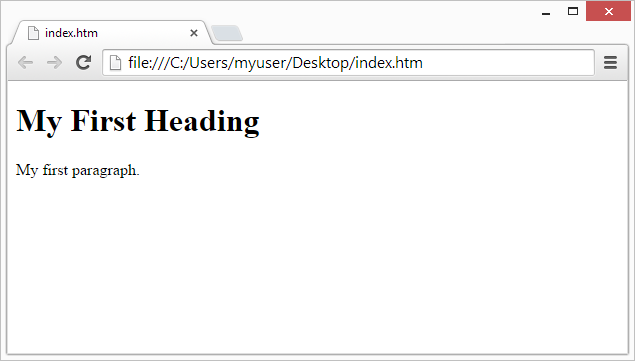
Using this description, a web browser will display a document with a heading and a paragraph.
What is Dynamic HTML.?
Dynamic HTML is a collective term for a combination of Hypertext Markup Language [HTML] tags and options that can make Web pages more animated and interactive than previous versions of HTML. Much of dynamic HTML is specified in HTML 4.0. Simple examples of dynamic HTML capabilities include having the color of a text heading change when a user passes a mouse over it and allowing a user to "drag and drop" an image to another place on a Web page. Dynamic HTML can allow Web documents to look and act like desktop applications or multimedia productions.
The Concepts and Features in Dynamic
HTML
- An object-oriented view of a Web page and its elements
- Cascading style sheets and the layering of content
- Programming that can address all or most page elements
- Dynamic fonts
An Object-Oriented View of Page Elements
Each page element (division or section, heading, paragraph, image, list, and so forth) is viewed as an "object." (Microsoft calls this the "Dynamic HTML Object Model." Netscape calls it the "HTML Object Model." W3C calls it the "Document Object Model.") For example, each heading on a page can be named, given attributes of text style and color, and addressed by name in a small program or "script" included on the page. This heading or any other element on the page can be changed as the result of a specified event such a mouse passing over or being clicked or a time elapsing. Or an image can be moved from one place to another by "dragging and dropping" the image object with the mouse. (These event possibilities can be viewed as the reaction capabilities of the element or object.) Any change takes place immediately (since all variations of all elements or objects have been sent as part of the same page from the Web server that sent the page). Thus, variations can be thought of as different properties of the object.
Not only can element variations change text wording or color, but everything contained within a heading object can be replaced with new content that includes different or additional HTML as well as different text. Microsoft calls this the "Text Range technology."
Although JavaScript, Java applet, and ActiveX controls were present in previous levels of Web pages, dynamic HTML implies an increased amount of programming in Web pages since more elements of a page can be addressed by a program.
A feature called dynamic fonts lets Web page designers include font files containing specific font styles, sizes, and colors as part of a Web page and to have the fonts downloaded with the page. That is, the font choice no longer is dependent on what the user's browser provides.
Style Sheets and Layering
A describes the default style characteristics (including the page layout and font type style and size for text elements such as headings and body text) of a document or a portion of a document. For Web pages, a style sheet also describes the default background color or image, hypertext link colors, and possibly the content of page. Style sheets help ensure consistency across all or a group of pages in a document or a Web site.
Dynamic HTML includes the capability to specify style sheets in a "cascading style sheet" fashion (that is, linking to or specifying different style sheets or style statements with predefined levels of precedence within the same or a set of related pages). As the result of user interaction, a new style sheet can be made applicable and result in a change of appearance of the Web page. You can have multiple layers of style sheet within a page, a style sheet within a style sheet within a style sheet. A new style sheet may only vary one element from the style sheet above it.
Layering is the use of alternate style sheets or other approaches to vary the content of a page by providing content layers that can overlay (and replace or superimpose on) existing content sections. Layers can be programmed to appear as part of a timed presentation or as the result of user interaction.
<!DOCTYPE html>
<html>
<head>
<title>Page Title</title>
</head>
<body>
<h1>This is a Heading</h1>
<p>This is a paragraph.</p>
</body>
</html>
HTML tags are keywords (tag names) surrounded by angle brackets:
<tagname>content goes here...</tagname>
- HTML tags normally come in pairs like <p> and </p>
- The first tag in a pair is the start tag, the second tag is the end tag
- The end tag is written like the start tag, but with a forward slash inserted before the tag name
How to display HTML output this program now let's see the output following window
Web Browsers
The purpose of a web browser (Chrome, IE, Firefox, Safari) is to read HTML documents and display them.
The browser does not display the HTML tags, but uses them to determine how to display the document:
HTML Page Structure
Below is a visualization of an HTML page structure:
<html>
<head>
<title>Page title</title>
</head>
<body>
</html>
<h1>This is a heading</h1>
<p>This is a paragraph.</p>
<p>This is another paragraph.</p>
</body>
Only the <body> section (the white area above) is displayed in a browser.
The <!DOC TYPE> Declaration
The <!DOC TYPE> declaration represents the document type, and helps the browser to display a web page correctly.
It must only appear once, at the top of the page (before any HTML tags).
There are different document types. To display a web page correctly, the browser must know both type and version.
The doc type declaration is not case sensitive. All cases are acceptable:
<!DOCTYPE html>
<!doctype HTML>

